February 13, 2013

Review: BeejiveIM for the iPad

Review: BeejiveIM for the iPad

Posted by on Jun 10, 2010

This post was published 2 years 8 months 3 days ago which may make its actuality or expire date not be valid anymore. This site is not responsible for any misunderstanding.

I still remember back to the olden times, when Instant Messaging was the hot new app taking the world by storm. Back then, the big question was ICQ or Yahoo or AIM. Interoperability between Instant Message Apps was out of the question at the time, and was causing brutal legal wrangling by all the major players, trying to make sure that they kept the walls high between them. To listen to them you would have thought the world would end if an ICQ user had been able to chat with a Yahoo user. Mixing of that nature was what brought down the Roman Empire!

Needless to say such an attitude is a thing of the dim and distant past since IM software is now ubiquitous and the leading clients are able to log into ALL the major services and then some, mixing your various friends lists into a social soup. Now, the important thing isn’t the the network involved…but the interface. One of the best and most successful IM interfaces on the iPhone has been BeejiveIM, so it is little wonder that Beejive has been ported to the iPad, but how successfully? After all, plenty of great iPhone apps have discovered that excelling on the iPad takes more then just filling up the extra screen space. Has BeejiveIM lost a step in the expansion, or is it still the IM client to beat?

Like a lot of iPhone applications, the first thing that BeejiveIM did when it got to the iPad was spread itself out all over the screen…and it makes good use of all that beautiful space. In portrait mode you always have the chat window showing the active chat taking up two thirds of the screen on the left, and a list of current chats filling the remaining third on the left hand side. One of my favorite little touches in this app is that in the Current Chats list, the last unread message from all open chats appear along with their names, which makes it very easy to make sure you haven’t missed and brief but essential statement, like “The police are here” or “I’m pregnant”.

The keyboard slides in from the bottom when you tap the screen, or you can tap the screen again to slide it out of the way to read more of the active chat.

At the very top of the screen you have a control to drop down your aggregated Friends list showing your friends on all the services you are signed into as well as buttons to open your Account window and a small Options window. In the Options window, you can set the wallpaper for the active chat window which is a very nice touch. BeejiveIM comes with several nice neutral backgrounds preinstalled, or you can use any images in your Pictures library. Most of the heavy duty configuration options, such as controlling the appearance of the interface or how notifications work, etc appear in the iPad Settings, and can’t be accessed from within BeejiveIM.

The Accounts window allows you to set your availability, in what ever way the service you are logged into allows. Most services allow you to set yourself as available, busy, away or invisible, with either standard messages or the chance to write your own witty, profound away messages to amuse your friends.

The active chat itself is presented in the “comic book” style that is in vogue for IM programs currently, with profile pictures speaking in word balloons, forming a conversation flowing up the screen as the discussion progresses. This can take a little getting used to, but all in all once you get the hang of it this style makes it very easy to follow the conversation and keep track of who is speaking. At the top of the chat is the name of the person you are speaking with, and the service they are logged into along with access to their profile and several different controls to send them a picture, and email or a voice message.

In landscape mode things are arranged a little differently. You have roughly a quarter of the screen on the left always taken up by your Friends list (which is a drop down menu in portrait mode) and about a quarter on the right with your current chats. The active chat fills up the half of the screen remaining in the middle. This is definitely my favorite of the two modes, since it puts all the information right out there in front of you, so no one can accuse you of ignoring them (unless of course you ARE ignoring them, in which case you have no excuse so fess up). Also the keyboard is MUCH easier to type naturally with in landscape mode.

So chatting is clear and intuitive on BeejiveIM…bur who can you actually chat with? Well the number of different accounts you can log into with BeehiveIM is quite impressive. Using BeejiveIM you can work with AIM, MobileMe, Google, ICQ (are they still around?), Jabber, MSN, MySpace, Yahoo and Facebook…or any combination thereof. Between those various services you should be able to speak with anyone who has a computer or internet device of ANY kind, and likely some people who don’t.

IM programs have become like death, taxes and things which update your Facebook page…they seem to be unavoidable these days. However, they are also an essential tool for anyone who lives, works or plays on the internet. It is hard for me to even consider what life would be like without being able to check my gchat now and again. Therefore, such clients are naturals for internet devices like the iPad. As essential as an app like this is, it is still nice that BeejiveIM is so well designed and complete. It has all the features you would need in a complete Instant Messaging solution without going too far. Even the bells and whistles in this app are useful elements. On top of that the GUI is elegant, attractive and highly intuitive. You will have to look a long time to find a communications application as powerful as BeejiveIM that is easier to use.

I can definitely give BeejiveIM my wholehearted recommendation. I had never used this app before encountering it on the iPad, but it is now my IM client of choice both here and on my iPod Touch.

BeejiveIM is available in the for $9.99.


Posted by: vepemotevi at 01:02 AM | No Comments | Add Comment
Post contains 1131 words, total size 7 kb.

February 12, 2013

Ebooks: iRex Closing the Book

Ebooks: iRex Closing the Book

Posted by on Jun 10, 2010

This post was published 2 years 8 months 3 days ago which may make its actuality or expire date not be valid anymore. This site is not responsible for any misunderstanding.

iRex, the Dutch company that produced the Illiad ebook reader for several years, and recently started selling their new DR800 reader in Best Buy stores has filed for Chapter 11. Whether they will proceed to bankruptcy isn’t clear yet, but iRex brass are apparently hopeful this can be turned around. Analysts are less so.

Its not hard to see where iRex’s troubles have stemmed from. It has zero consumer name recognition in a field that is now populated by Amazon and Barnes & Noble and Sony and…oh yeah, Apple. Beyond that iRex doesn’t have it’s own online bookstore, which is a prime moneyspinner and awareness factory for those four competitors I already mentioned.

Last but not least, the quite decent DR800 which was supposed to make the company’s fortunes missed it’s December release date and shipped in February instead. So it it DID make a holiday release as promised, only the wrong holiday. Valentines isn’t exactly Christmas, not even in Holland.

I hope that iRex is able to come out of Chapter 11 and take another run at the ebook market outside of Europe. The DR800 really looked good, and I think that they would have a good chance of carving out a niche as a dedicated ebook reader amongst the tablets. Of course, they are going to have to drop that pricetag a good deal to manage it.

(Source: )


Posted by: vepemotevi at 11:42 AM | No Comments | Add Comment
Post contains 289 words, total size 2 kb.

February 11, 2013

iPad Month: FBI to Investigate iPad Hack? HUH?

iPad Month: FBI to Investigate iPad Hack? HUH?

Posted by on Jun 10, 2010

This post was published 2 years 8 months 2 days ago which may make its actuality or expire date not be valid anymore. This site is not responsible for any misunderstanding.

OK now, let me get this straight. The Federal Bureau of Investigation has said they are taking over the investigation into the recent minor data exposure of around 114,000 iPad users. The data was exposed not through a complex and artful case of cyber crime or digital espionage, or even good hacking. AT&T happened to have next to no security to keep people from using a simple script on their website designed to give you the email address mapped to the ICC-ID or Integrated Circuit Card ID you enter. The ICC-ID is basically the serial number of the SIM card in the iPad.

No financial data was exposed, no credit card info, no health of private information…there was no way that this information could be used to spoof or impersonate the user, or defraud them in any way. It was a simple script to help AT&T identify the owner of a lost device. All the hacking group got, very maturely known as Goatse Security, were emails (most of them public anyway) and a relatively useless ID number. In fact the output of this whole operation was so useless the Goatse Security lads realized they had more to gain by exposing the escapade and paint themselves as whistleblowers, documenting AT&T’s poor security.

This is a case for the FBI? Really?

Well, you must keep in mind that sources say that many of the people whose emails (their public emails, mind you) and ICC-IDs were snatched are high ranking figures in government and the Justice Department. You know, the same Justice Department that the FBI reports to.

So in other words, some Justice Department types heard the words HACK and DATA and IPAD and panicked like little girls on their first sleepover and screamed for a federal case to be made out of it…literally. Seriously, what will the FBI investigate? We know who did it, they have explained HOW they did it, and turned over the data they snatched. What is there left? To find out why they named their little club after a picture of a man stretching his anus to insane proportions?

I wonder how many millions will be spent this time in the service of technophobia, over reaction and the need to be perceived as being “on top of this cyber crime stuff”? I am all for protecting privacy…but the FBI????

(Source: )


Posted by: vepemotevi at 10:22 PM | No Comments | Add Comment
Post contains 461 words, total size 3 kb.

Adobe Flash Hits Key Milestones

Adobe Flash Hits Key Milestones

Posted by on Jun 13, 2010

This post was published 2 years 7 months 30 days ago which may make its actuality or expire date not be valid anymore. This site is not responsible for any misunderstanding.

“What iPhone??” asks Adobe as they took more steps to solidify their position as the number one source of video for the mobile web (except for Apple users, of course). First and foremost Adobe announced that Flash v10.1, a version which most all of us have been using in beta for ages, has finally been official released for Windows PCs and netbooks.

The reason why this release has been so eagerly awaited is that it contains full support for mobile devices, which includes hardware acceleration (including using next-gen mobile graphics chips like the ION and Tegra) and smooth streaming. I have been using 10.1 on netbooks for a couple months now in beta and I am very impressed with the overall video quality and the HD support it brings. Get the official release .

But wait…there’s MUCH MORE after the jump if you can bear the battery sucking evil of Flash…

The excitement goes way past the final release of 10.1 for netbooks. Flash 10.1 beta 2 for Android is also available for download, now running on Android 2.2’s new hotness. Give Google a hand sticking another thumb in Steve’s eye by downloading the Android version and give it a spin.

Really want to piss Apple off? Try out the new “preview” (which could also be translated as “provocation”) of the Flash player “Gala”, designed just for Mac OS X. Read more about it and download it .

Also exciting, and hidden deep inside Adobe’s release information on their website is the fact that Microsoft may have been playing a “three graphics card monte” with us in regards to support for Flash. Redmond has said several times that the first release of Windows Phone 7 will NOT include Flash, no way no how.

However, the Adobe has this to say…

Flash Player 10.1 adds support for a broad range of mobile devices, including smartphones, netbooks and other Internet-connected devices, allowing your content to reach your customers wherever they are. Target mobile operating systems for Flash Player include: Android, Microsoft Windows Phone 7, Palm webOS, and Symbian S60 V5.

Hmmm….OK, so it may not be ready on release, but looks like we will be seeing Flash on Windows Mobile 7 sooner rather than later. In fact,  I would not be surprised if Steve Ballmer does his Steve Jobs impression at the WP7 roll out and stops on his way off the stage…”Oh…just one more thing. Flash 10.1 out of the box. Boom.”

I just hope he doesn’t wear a turtleneck. Really, just….No.


Posted by: vepemotevi at 09:02 AM | No Comments | Add Comment
Post contains 479 words, total size 3 kb.

February 10, 2013

iPhone 4 To Make Enterprise Inroads

iPhone 4 To Make Enterprise Inroads

Posted by on Jun 13, 2010

This post was published 2 years 7 months 29 days ago which may make its actuality or expire date not be valid anymore. This site is not responsible for any misunderstanding.

Since the very first iPhone was released what seems like decades ago, Apple has been trying to find a way into the Enterprise. However, that has not been easy since the iPhone has made it’s bread and butter as the first “consumer” oriented smartphone and has always been a bit light about the native apps that business users look for, such as MS Exchange and Outlook syncing. On top of that, corporate network and security executives hate the iPhone like casual friday, since Apple refuses to give them the ability to carefully manage and customize the iPhone as they do other more Enterprise-conscious smartphones.

In fact it is the mix of business applications and corporate management that has made the Blackberry king of the Enterprise smartphones, for all it’s 3G faults. Now however it appears that Apple is finally pushing their way into many Enterprises, especially in Europe, using that oldest of all marketing weapons…demand.

For example, Swiss banking powerhouse UBS is now looking seriously as switching over at least some of it’s 18,000 Blackberry users over to new iPhones and are working with syncing experts Good Technology to come up with a cross platform back end  to allow business information to be secured and centrally controlled on any smartphone, including the iPhone.

According to analysts this possible change of heart comes from users who already have personal iPhones and want to be able to combine personal and business data and tasks on a single phone, rather than carrying an iPhone AND a Blackberry…plus there all those applications.

Other Euro enterprises, such as UK bank Standard Chartered is already starting to allow some users to opt for iPhones, and pharmaceuticals company AstraZeneca has started iPhone trials with top executives. AstraZeneca says the main reason for looking at allowing the iPhone into their network is that user requests to do has become one of the main issues their IT staff deals with every day. It seems to be becoming less of a headache to deal with any security and integration issues the iPhone may have then to have to keep saying no.

All of the analysts say they do not view it likely that the iPhone will REPLACE the Blackberry in the Enterprise, or even possible for it do so…however more and more businesses are giving their users the right to opt for an iPhone if they so desire. What restrictions and rules IT departments will impose on those users and what they won’t allow their staff to do with their iPhones has yet to be seen, however.

I know more and more business people who have iPhones, at least as a personal phone. ON top of that, I would expect there to be a strong push for more iPhones in the Enterprise after the release of iPhone 4 as the video conferencing seems to be a killer app for business right now. Every business person with an iPhone I know is planning to upgrade to 4 as soon as possible, and most site FaceTime as the reason for the change.

So it looks like Apple’s refusal to give ground to Enterprise is paying off, with Enterprise forced to bow at least slightly to the one force more powerful than front office policy…subscriber pressure.

(Sources: , )


Posted by: vepemotevi at 07:42 PM | No Comments | Add Comment
Post contains 607 words, total size 4 kb.

Is the Microsoft Kin 2 Worth Kinsideration?

Is the Microsoft Kin 2 Worth Kinsideration?

Posted by on Jun 11, 2010

This post was published 2 years 8 months ago which may make its actuality or expire date not be valid anymore. This site is not responsible for any misunderstanding.

The Kin 2 is a three way collaborative effort involving Microsoft, Sharp, and Verizon. The result is a new approach on the way to Smartphone telephony that for me was disappointment piled on disappointment. It seems strange somehow that while the Windows Mobile operating system is ready for a serious redo, this Microsoft device has nothing to do with WM OS.

Right out of the gate, the most profound and amazing letdown is the fact that it is not possible to add any applications to this unit. You must accept it as is. So there’s no use complaining about the lack of an app store, for there are no apps. Unbelievable.

You cannot even add things like Google Maps. Of course there is no GPS and not even a way to add third party functionality with an antenna because you cannot install any software.

While you can access Google Docs and Notebook you cannot edit or create new documents. If you want to access other Microsoft applications such as Word or Excel or PowerPoint you can forget about it. There’s not even a way to take notes or to record audio notes.

I could go on about how it won’t make 31 flavors of ice cream and it won’t stop a missile attack, but it was never intended for these things. What was the intention? Apparently the developers have isolated a target market for this device among the younger generation and its preoccupation with music, photos, texting, and social networking. But what about gaming? Sorry, no games—not even solitaire.

The programs that come pre-installed on the device facilitate the above functions, and that’s about it. The installed apps include the following: Phone, Music, Help, Alarm, Browser, Settings, Email, Feed Reader, and Search. By the way, the search function only applies to items on the phone, not the Internet, and there is no voice search.

All these apps appear on one of three panels that can be rotated into view when the device is turned on.

Two more panels are available with the flick of a finger (yes, it is finger friendly—but the scrolling is slow). One of the screens contains posts from your favorite social networking sites such as My Space, Facebook, and Twitter. This page is called the Kin Loop. The remaining page contains your favorite contacts with pictures if you wish and access to all the rest of your contacts.

These would be handy functions for many people. You can add more content to the apps page as links to your favorite Websites, which is nice. But you are still limited to only three pages.

An innovative feature that goes along with the teenie bopper crowd that this device is apparently aimed at is the ability to share stuff. There is a little blue button at the bottom of every screen. This is called the Kin Spot. All you have to do is drag something to it and you can share it with your pals. It can be a file, a Website, a picture, a video, a tune, an email, a text message, whatever you want, however you want to send it. This is nice.

Another innovative feature of the Kin 2 is that everything is backed up online to the Kin Studio so that you never have to worry about losing your data. There is no syncing as such, but you can connect to your online account wirelessly and remotely to transfer files back and forth. I like this feature, but I fear that it may add to the cost of the account.

I was able to import all my Gmail information and contacts. I was also able to access my calendar from Gmail as well as my tasks.

Thank goodness for Google. Without Google, this device would be less useful. While I can edit and add items in calendar, tasks, and notebook, I cannot edit or create new docs in Google Docs, which is a shame. At least Notebook gives me the ability to take notes, a functionality that is otherwise lacking. However, I understand that Google has discontinued the support of Notebook and that if you don’t already have an account, you cannot get a new one. Too bad.

As an aside, there are some good alternatives to Notebook available such as Evernote and Zoho Notebook. I prefer the latter because of its collaborative features.

I am happy to report that Google Voice works with the Kin 2. If you’re not familiar with Google Voice, I recommend applying for an account. Voice not only records your voice mail, it transcribes it and allows you to scroll through your list of voicemail so that you don’t have to listen to every message. It also compiles a directory of all your messages in one place so that you can instantly review your email, texts, IMs, and voice mail. It notifies you of incoming activity too.

But that’s not all. Voice also gives you a free Voip phone number that you can use to make free phone calls over the Internet. People can also call you on that number. You can use it for free texting as well, which makes it a great money saver and convenience.

Browsing on the Kin 2 at first seems to be just fine with the initial screen fitting the device perfectly and with little tabs along the top. You can drag down the address bar to type in a new address or to go back to a previous screen.

You can scroll with a finger gesture, but it doesn’t glide as well as other devices I’ve tested. You can also use a finger gesture to expand or contract the image on the screen. However, when the image is enlarged, you must be prepared to scroll around for it does not wrap to the screen, which I find annoying and inconvenient.

While my first choice of a keyboard is in the vertical position, I must say that the slide-out QWERTY, horizontal, backlit keyboard on the Kin 2 is very nice. The keys are round and elevated for a good tactile quality that makes it easy to type without mistakes.

I found the sound quality on the phone to be satisfactory as well as the audio playback on the FM radio and stereo music player. I did miss calls repeatedly because the phone simply did not ring for incoming calls even though the volume was at the highest level. Media playback formats include AAC, MP3, WMA for audio; h.264/AVC, MPEG-4, WMV for video; JPEG and PNG for images. There is a 3.5 mm jack for stereo audio output and built-in speakers.

As far as music goes, you can import your own but this device is an extension of Microsoft Zune, and you are encouraged to join the Zune music streaming service for $15 a month, which adds considerably to the monthly cost.

Kin 2 has a nice 8 MPX camera on board with video, auto focus, digital zoom, and flash. Pictures are automatically geotagged if within range of cell towers for triangulation. I found that this feature rarely worked.

This device comes with 8 GB of internal memory which could get filled up fast with tunes and pix. Unfortunately, there is no expansion slot. I suppose that’s a good reason to take advantage of Zune’s streaming media so as not to use up valuable storage space.

With a 3.4 inch display and a 320 x 480 resolution, the Kin is not the brightest kid on the block. It measures 4.25 X 2.5 x .75 inches and weighs 4.7 ounces.

Its 1390 mAh Li-ion battery has a suggested standby time of 232 hours. I found that the battery drains fairly rapidly under normal usage and I would have difficulty getting through the day without a recharge. At least the battery is replaceable so that you can carry a spare.

Connectivity to the outside world is accomplished by means of 802.11 b/g Wi-Fi with WEP, SPA, WPA2 encryption as well as Bluetooth 2.1 + EDR. There is no infrared and no GPS. Localization is accomplished by means of cell tower triangulation, which is referred to as GPS.

The Kin 2 is capable of sending both SMS and MMS messages. It supports POP3, IMAP, and Push email (exchange).

There are built-in sensors for an accelerometer and ambient light detection. Additional features include flight mode and TTY/TDD accommodation.

Kin 2 costs $199, but you get a $100 rebate with a two year contract bringing the price down to $99. A contract will cost in the neighborhood of $69 per month for text, phone, and data. Add another $15 for streaming Zunie tunes.

Conclusion

The Kin 2 has some innovative features such as wireless Web syncing and automatic backup of data online. The Kin Spot for sharing is also a creative idea unique to the Kin. I suppose the Zune tune streaming approach is a good idea too, if you want to pay for it. It has a nice 8 MPX camera, and you can easily send video clips via email or MMS. The slide out horizontal keyboard is a pleasure to use. I hope the Kin will appeal to the intended audience with its orientation to social networking.

However, the Kin 2 impresses me more as a novelty phone than a serious productivity tool. I would never consider the Kin 2 personally because I can’t hook it up to a Bluetooth keyboard for travel and meetings. I cannot access, create, or edit my Office documents. It has no means of taking screen shots. I wish it had a memory card. Navigation with GPS would be nice too.

I could go on and on about what it doesn’t do but that’s not fair because it clearly was not designed to be a workhorse for a road warrior who wants to leave his laptop at home. It’s more of a toy for teens who are attached to Twitter, text, and tunes.

The biggest deal breaker for me is the fact that there are no apps available for it, and it is incapable of downloading common apps out there such as Google Maps. This is really inconceivable this day and age with iPhone, Android, and Palm Pre Plus competing for market share with bazillions of cool apps. And what about the intended audiences’ penchant for game playing? No games. Big mistake.

I have heard a rumor that Microsoft may eventually integrate the Kin with Windows Mobile 7 when it is released and then it would be possible to add apps to it. But for now the lack of apps is a highly negative factor.

While the Kin 2 does not measure up to my expectations for a device I would want in my pocket, it may very well suit the needs of the intended audience if the interest is indeed focused on social networking, pics, tunes, and text.


Posted by: vepemotevi at 06:22 AM | No Comments | Add Comment
Post contains 1879 words, total size 11 kb.

February 09, 2013

Palm Pixi Plus on AT&T: Now Free!

Posted by: vepemotevi at 05:02 PM | No Comments | Add Comment
Post contains 7 words, total size 1 kb.

In-flight entertainment might soon include iPads

: Can you fly this plane, and land it?
: Surely you can’t be serious.
: I am serious… and don’t call me Shirley. – Airplane

“Ladies and gentleman you are now free to use approved electronic devices” are the sweetest words you can hear on an airplane. That’s when you can pull out your iPad. But what if you don’t have an iPad? Then you’re left staring enviously at the passengers that do.

But it seems that Jetstar, a subsidiary of Qantas, has a solution in iPads for rent on every flight.  They will begin a trial program later this month with iPad’s available pre-loaded with movies, music, TV shows, games and books for $10.

“We are really excited to commence trialing the iPads, as we’re always looking for ways to enhance our customer’s Jetstar experience. Given the demand for the iPad so far, I anticipate it will have strong appeal amongst our passengers,” said Jetstar CEO Bruce Buchanan as reported by.

And here’s the clincher they will even allow for the iPad to be used during take-off and landing, when other electronic devices have to be shut off. I think this will prove to be a popular program for sure. Not only will it provide great entertainment to passengers, but I foresee it leading to more iPad sales. If you can put an iPad in someone’s hands for a 2 hour flight you’ll likely have a future iPad customer. I’m sure many of you have experienced putting an iPad into the hands of a non-believer only to have to pry it out of their hands an hour later.

So would you like to see iPads making an appearance on your future flights?


Posted by: vepemotevi at 03:42 AM | No Comments | Add Comment
Post contains 289 words, total size 2 kb.

February 08, 2013

Do you need unlimited internet on your iPad?

Do you need unlimited internet on your iPad?

by on Jun.05, 2010, under

So the big question going through every iPad owners mind right now is do I need unlimited internet on my iPad or is 2GB enough? If you have not purchased your iPad by midnight on June 6th than you will have the option of either the 200MB data plan for $14.99 a month or the 2GB data plan for $25.00 a month, but for iPad owners who purchased before June 6th you also have the option of unlimited internet for $29.99 a month provided that you lock that in by midnight on June 6th and you must maintain the unlimited plan in order to remain eligible.

Gone is the flexibility that AT&T touted at the iPad’s debut allowing us to go from unlimited, 25oMB or no internet at all month to month at will, with no contracts. So what to do? Do you need unlimited internet or will 2GB suffice? For many iPad users it’s too soon to tell. If you’ve only had your iPad a few days or weeks do you have a full grasp on just how much internet you’ll average per month? Probably not.

2GB is actually quite a bit of data for example I’m a very heavy data user on my iPhone and use approximately 500MB a month and after comparing with my friends I was the heaviest iPhone data user by a lot. So I think the new data plans will be good for many users. That is, until you start watching video.

According to AT&T 2GB of data will get you the following:

Sending/receiving 10,000 one-page text emails and 1,500 one-page emails with an attachment, viewing 4,000 Web pages, uploading/downloading 500 photos to social media sites, and (only) 200 minutes of standard-quality video watching a month

Gizmodo did some real life testing and came up with :

YouTube: When we watched a , 2MB was used; so if 2GB is 2048MB, one could theoretically watch 17 hours of programming on YouTube before using up all your bandwidth for the month. This assumes you do NOTHING else on your iPad that eats up bandwidth.

Netflix: When we watched an episode of Netflix () running 21:54, 55MB of bandwidth was used; so, let’s say 22min is 55MB, then Netflix consumes 2.5MB for every minute of streaming video watched. Therefore:

  • A half hour TV show (~22min.) on Netflix would consume 55MB of data
  • An hour-long TV show (~43min.) on Netflix would consume 110MB of data
  • An hour-long movie on Netflix would consume 150MB of data
  • An hour and a half movie on Netflix would consume 225MB of data
  • A two-hour movie on Netflix would consume 300MB of data

** In total, you could watch 13.65 hours of programming on  before using up all your bandwidth. This assumes you do nothing else on your iPad that month to eat up your bandwidth.  (And remember: the average American  per month alone.)

ABC App: We watched an episode of Better Off Ted, running 25:41 with ads used 97MB. For simplicity’s sake, let’s average it out to 26min and 100MB. That’s ~4MB/minute.

  • A half hour TV Show on ABC streaming would consume an estimated 100MB
  • An hour-long TV Show on ABC streaming would consume an estimated 200MB

** In total, you could watch 10.24 hours of programming on ABC Streaming App before using up all your bandwidth. Again, this assumes you do nothing else on your iPad that month.

I see the iPad as a media consumption device. Keyword: consumption. And if you also plan on using the iPad to watch videos than I suggest you get on the unlimited plan now while it’s still available. The good news is after a few months if you don’t feel like the extra $5 a month for unlimited is worth it you can always downgrade to the 2GB plan. But if you’re not on the unlimited plan in time you’ll miss out for good.


Posted by: vepemotevi at 02:22 PM | No Comments | Add Comment
Post contains 666 words, total size 4 kb.

News Flash: Gadgets are distracting

News Flash: Gadgets are distracting

by on Jun.07, 2010, under

The yesterday about the effect that our 24/7 access to information through email, phone calls, texts, Twitters and the web via our gadgets is overloading our brains.

nytimes article“While many people say multitasking makes them more productive, research shows otherwise. Heavy multitaskers actually have more trouble focusing and shutting out irrelevant information, scientists say, and they experience more stress.”

At least I think it was a great article, I started to read it and then an email came in that I had to read, which reminded me I needed to return a phone call and then my dog was being extra cute so I had to take a picture and post it to my Facebook page, then it was time to harvest my We Rule crops, which of course made me hungry so I headed over to Yelp to figure out where to go for lunch and then the guy in the car behind me kept honking because the light was green and . . . what were we talking about?


Posted by: vepemotevi at 01:02 AM | No Comments | Add Comment
Post contains 185 words, total size 1 kb.

February 07, 2013

Wired Magazine’s iPad edition on pace to outsell print edition

Wired Magazine’s iPad edition on pace to outsell print edition

by on Jun.10, 2010, under ,

wired ipad app

After just nine days Wired Magazine for the iPad has already sold over 79,000 copies. That’s pretty impressive, and to put it in perspective their newsstand sales average around 80,000 per month. While that number does not include subscription sales, this is still quite a coup for iPad magazines.

It will be interesting to see what will happen in coming months. We might see that sales were high for Wired on the iPad because of the newness and excitement and will drop off in the coming months. Or we might see Wired (and parent company Conde Nast) lower their pricing and continue to improve their offering.

What do you think? Would you rather get Wired on the iPad or print? What about other publications you read? I renewed my MacWorld subscription on my iPad through Zinio rather than the print edition. I really enjoy reading MacWorld and the other magazines I’ve subscribed to on the iPad. I love the interface and I love that all my magazines are with me at all times. But I have to admit I miss a few things about actual print magazines. I can’t dog ear a page to remind me to come back to it. I can’t hand the magazine over to a friend when I’m done with it. I can’t leave a copy on my coffee table for others to look through. If you’ve ever been to my house you know I like to leave a copy of Scientific America out on the coffee table to impress you.


Posted by: vepemotevi at 11:42 AM | No Comments | Add Comment
Post contains 281 words, total size 2 kb.

February 06, 2013

Guinness recognizes the fastest iPad typer

Guinness recognizes the fastest iPad typer

by on Jun.02, 2010, under

With Federer battling it out at the French Open and the Lakers and the Celtics meeting up in the NBA playoffs it’s understanding that you might have overlooked this incredible competition, but the title of Worldest Fastest iPad Typer has been bestowed upon 28 year old Joseph Grech.

guinness world record holder for fastest typing

The Guinness World Records team showed up to the iPad’s debut at an Apple store in the UK where Grech was in line at 3am looking forward to being one of the first to get an iPad. Over 30 people competed with the goal of typing the alphabet from A-Z in the fastest time and Grech clocked 6.61 seconds barely beating out the second fastest time of 6.7 seconds.

Guinness World Records spokesman said,

“The new Apple iPad is such an iconic and exciting device. Today it seems only fitting that arguably the biggest launch in Apple’s long and distinguished history is also the backdrop to its iPad being involved in a Guinness World Record breaker attempt.”

worlds tallest married couple buys ipads

The good people of Guinness were also on hand to catch a photograph of the world’s tallest married couple purchasing their iPads. Thank God that moment did not go undocumented.


Posted by: vepemotevi at 10:22 PM | No Comments | Add Comment
Post contains 212 words, total size 2 kb.

Security alert! You’re iPad 3G has been breached

Posted by: vepemotevi at 09:02 AM | No Comments | Add Comment
Post contains 8 words, total size 1 kb.

February 05, 2013

Modified Macs make great iPad stands. Who knew.

Modified Macs make great iPad stands. Who knew.

by on Jun.10, 2010, under

Welcome to another episode of Repurposing: The iPad edition. If you have an old Macintosh or iBook just laying around, taking up space, it’s time to put it to work on behalf of your new iPad.

Exhibit A:  a 1984 Macintosh makes a geek-tastic iPad stand

macintosh ipad stand

Exhibit B: iBook finds a new life as an iPad stand with keyboard

ibook ipad stand 1ibook ipad stand 2

ibook ipad stand 3ibook ipad stand 4

Ooh. I have an idea. What if you bought two more iPad’s and you fashioned them together with an extra set of white Apple headphones into a makeshift stand and then . . . .


Posted by: vepemotevi at 07:42 PM | No Comments | Add Comment
Post contains 115 words, total size 2 kb.

iPhone 4 announced – What this means for iPad 2

iPhone 4 announced – What this means for iPad 2

by on Jun.08, 2010, under

So yesterday’s was amazing. I think we learned a lot what is coming down the road for iPad 2.

I think an exciting thing will be the aluminosilicate glass – glass that’s 20 times stiffer and 30 times harder than plastic. It’s also finger print proof! No more smudges!

Another great feature is the retina display. I think that the display looks great, however, the retina technology is going to make this thing look like liquid. If you looked closely to the letters on this screen, you can almost make out the pixels in the letters. With retina display, each pixel is getting replaced by 4 smaller pixels that can even get higher resolution. Beautiful!

And one more thing we would like to see is the three-axis gyroscope. This will make movement with the iPad 2 in games amazing and accurate.

Read what about iPhone 4 announcement for iPad 2.


Posted by: vepemotevi at 06:22 AM | No Comments | Add Comment
Post contains 175 words, total size 1 kb.

February 04, 2013

AT&T pulls the Unlimited Data plan carpet out from underneath us

AT&T pulls the Unlimited Data plan carpet out from underneath us

by on Jun.02, 2010, under

Sometimes I think that AT&T is purposefully trying to disappoint all of their subscribers and send us running into Verizon’s welcoming arms. Like that person you used to date that didn’t have the heart to break up with you, so they just treated you really badly until you finally broke up with them. You know the one. And today’s data plan announcements only confirm my suspicions.

Up until now iPhone and iPad 3G users have basked in the warm glow of unlimited data, meaning endless hours of Pandora radio,  Netflix movies, stalking that Ex’s Facebook page (c’mon, you know the one). But it’s all coming to an end. Pretty soon, we’ll be sounding just like our grandparents anytime we take them to Starbucks, “$4.00 for a cup of coffee! In my day we paid 10 cents for a coffee!”. Only we’ll be saying “Remember when we used to have unlimited internet. Those were the days.”

So here’s what you need to know:

New plans: The new plans apply to both the iPad and the iPhone and you will have two options. A $15 a month plan that includes 200MB of data usage each month or a $25 plan that includes 2GB a month. Tethering is now available for the iPhone with an additional $20 a month charge on top of your monthly data charge.

iPad Users: It’s not too late. If you sign up for the existing unlimited plan on your iPads before June 7th and then you do not change your plan and allow it to keep automatically renewing than you will continue to have an unlimited plan. So, if you held out the extra month and paid the additional cost for a 3G iPad specifically because of the unlimited plan (like me) than get on it and stay on it because after June 7th it is no more. Does it feel like a bit of a bait and switch? Yeah? That’s because it is. One of the really exciting things about the iPad 3G was the flexibility of the plans. You could come and go from no data plan, to 250MB to unlimited as needed. And now just two months after the iPad’s debut that flexibility has been taken away. If you want the iPad’s unlimited plan, speak now or forever hold your peace.

iPhone users: If you are already an AT&T user (iPhone or otherwise) you will still be on the unlimited plan for $30 a month (phew!) and you can get a new phone and extend your contract with AT&T and stay on the unlimited plan. But you will not be able to add tethering to your iPhone. Users coming over to AT&T after June 7th will be coming onto the new plans.


Posted by: vepemotevi at 05:02 PM | No Comments | Add Comment
Post contains 484 words, total size 3 kb.

Hewlett-Packard spends $1.6M to lobby government in 1Q, one of highest spends in industry

Google

Google

Hewlett-Packard spends $1.6M on 1Q lobbying

WASHINGTON — Hewlett-Packard Co. spent $1.6 million to lobby the U.S. government in the first quarter on a smorgasbord of issues including federal spending on technology, enforcement of immigration laws and health care reform.

The amount was nearly double HP’s $840,000 lobbying tab from the first quarter of 2009. HP spent $710,000 on lobbying in the fourth quarter of 2009.

Kristy Sternhell, formerly a counsel to Senate Majority Leader Harry Reid, was among the people who lobbied on behalf of HP, which is the world’s biggest technology company by revenue.

HP said in its latest lobbying-disclosure form, filed with the House clerk’s office, that it lobbied Congress and various government agencies. Those agencies included the Homeland Security and Labor departments, which HP lobbied on immigration-related issues, including legislation involving the creation of a computer network to verify that workers in the U.S. are legally able to work. Other agencies included the Health and Human Services department and the Federal Reserve System.

HP’s $1.6 million tab ranked among the highest for technology companies in the latest period.

Other big-time Silicon Valley tech firms spent less. Google Inc. spent $1.4 million in the first quarter to lobby the federal government on issues including its decision to stop censoring search results in China, and Oracle Corp. spent $1.1 million, in part on regulatory issues concerning its recent acquisition of Sun Microsystems.

However, Microsoft Corp., consistently one of tech’s biggest lobbying spenders, spent more than HP — $1.7 million on lobbying in the latest period.


Posted by: vepemotevi at 03:42 AM | No Comments | Add Comment
Post contains 271 words, total size 2 kb.

February 03, 2013

Video game companies get ready to show new ways to get entertained

Video game companies get ready to show new ways to get entertained

By Barbara Ortutay, AP
Thursday, June 10, 2010

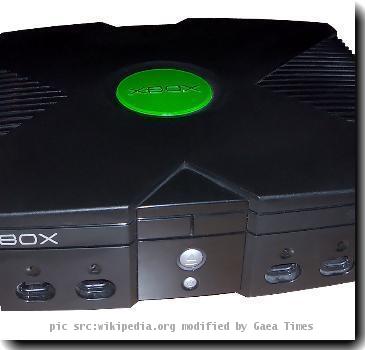
Xbox_consol_modified_59165_O

<b>Facebook</b>

Game companies ready to show new ways to play

NEW YORK — Video game makers are about to try to convince you that fancy 3-D screens, gesture-recognition cameras and ultra-sensitive motion controllers topped with brightly glowing spheres are what you need to have a good time.

They’ll do this as they try to emerge from a slump in the recession, which shocked a business long believed to be protected from, if not totally immune to, the workings of the broader economy.

Much of the industry’s success this year is riding on whether Microsoft, Nintendo, Sony and game publishers are able to sway consumers toward new, maybe even pricey ways to experience games — even as free or inexpensive options on Facebook, smart phones and the iPad compete for their attention.

Beginning next week at E3, as the Electronic Entertainment Expo in Los Angeles is called, game companies will show off several new mechanisms for playing games. Among them will be Move, which is Sony’s new motion controller for the PlayStation 3 and launches this fall, when it is expected to cost less than $100. A black remote with a color-changing ball on top, it builds on the success of the Nintendo Wii’s popular motion-control wand, but it promises more precision. A camera called PlayStation Eye recognizes the glowing orb and uses it to track the remote’s position in a 3-D space, further immersing players in the game.

Even so, Fidel Martinez may need a bit of convincing. The 19-year-old PlayStation 3 owner says he likes his button-filled video game controllers just fine, thank you. Walking out of New York’s Nintendo World store recently after buying a wallet, Martinez said he doesn’t think he’ll buy Move.

“It’s too weird,” said Martinez. “The times I’ve played (motion-controlled) games has been strange. I’d rather use the old kind.”

Sony is betting he’ll change his mind. Richard Marks, senior researcher at the company and the brains behind Move, thinks the controller will appeal to gamers like Martinez, even if they snubbed the Wii’s gesturing wand as kids’ stuff.

“One of our design goals was to make sure it stood out as a completely different experience that has never been seen before,” Marks said.

Serious gamers like Martinez are not the only ones on Sony’s radar. The company has been pouring millions of dollars into marketing the PlayStation 3 with the tag line “It only does everything.” The goal is to rope in consumers more likely to watch movies and play party games than shoot on-screen enemies for hours on end.

“In many regards we are treating the launch of Move like the launch of a new platform,” said Peter Dille, senior vice president of marketing for Sony Computer Entertainment. “We believe (it) will help us expand the audience of PS3 users.”

Microsoft, too, wants to expand its gaming audience — a concept Nintendo mastered with the 2006 launch of the Wii, which got moms, grandmas and grandpas playing alongside kids as young as 4 or 5.

Natal, Microsoft’s upcoming game technology, uses a camera and gesture recognition to turn players’ bodies into controllers. After the camera recognizes you — your body shape and movements down to the smallest toss of your hair, you’ll be able to swing your hands to swipe at on-screen dodge balls or pretend you’re Godzilla and smash virtual buildings with swing of your arm. You could even scan in your real-life skateboard to ride a version of it in a game.

“This is really what we like to think of as the rebirth of our brand,” said Dennis Durkin, chief operating officer of Microsoft’s video game business. “We’re trying to set the stage for the next 10 years.”

To do that, Microsoft needs to keep appealing to its core gamer fans, mostly men in their 20s, 30s and 40s who count “Halo,” ”Call of Duty” and “Gears of War” among their favorite entertainment franchises. But, like Sony with the PlayStation 3, it’s also selling the Xbox 360 to families as an all-in-one entertainment device. It already streams Netflix and connects to Facebook.

E3, which runs from Monday through Thursday, is where many store chains will decide what games and gaming systems, and how many of them, to stock for the holiday shopping season. That period is crucial for the industry, which analysts say gets about 40 percent of its revenue in the final three months of the year.

Analyst firm DFC Intelligence estimates that the worldwide video game retail industry will reap revenue of $59.5 billion this year, down slightly from $60.4 billion in 2009 and well below the more than $68 billion in 2008.

Because the industry has yet to fully rebound from the recession, Jesse Divnich, an analyst with Electronic Entertainment Design and Research, called E3 an “inflection point,” with game companies under pressure to impress.

While hardcore gamers have flocked to shooters and sequels with loyal predictability, newer, more “casual” players can be fickle. Largely responsible for the runaway success of the Wii, the players who dabble in video games as a hobby but not as a lifestyle can’t be expected to spend $60 every time a new game comes out, even in a better economy. That’s why it’s important for game companies to sell a wide range of entertainment options.

“Something that is new, something that is true innovation, something that unlocks new experiences,” said Microsoft’s Durkin, is something families “are willing to pay for.”

He may be right. Walking out of the Nintendo World store with her husband with some gifts for her daughter, stay-at-home mom Terri Marrone said she hadn’t heard of the new motion controllers from Sony or Microsoft. The family has a Wii, and three Nintendo DS systems, one for each of their kids. As for another motion control system, one that doesn’t even need a remote?

“We would definitely be interested,” said Marrone, who lives in New Brunswick, N.J. “It sounds cool.”


Posted by: vepemotevi at 02:22 PM | No Comments | Add Comment
Post contains 1025 words, total size 7 kb.

AT&T hole exposes iPad users’ e-mail addresses; hackers harvested data by tricking website

Apple Inc. in the NYC DOE

Examples Apple, Inc

AT&T hole exposes iPad users’ e-mail addresses

SAN FRANCISCO — AT&T Inc. on Wednesday acknowledged a security weak spot that exposed the e-mail addresses of apparently more than 100,000 users of Apple Inc.’s iPad, a breach that could make those people vulnerable to precision-targeted hacking attacks.

The vulnerability only affected iPad users who signed up for AT&T’s “3G” wireless Internet service.

It involved an insecure way that AT&T’s website would prompt iPad users when they tried to log into their AT&T accounts through the devices. The site would supply users’ e-mail addresses, to make log-ins easier, based on unique codes contained in the SIM cards inside their iPads. SIM cards are used to tell cell-phone networks which subscriber is trying to use the service.

The hacker group that claims to have discovered the weakness — the group calls itself Goatse Security — said it was able to trick AT&T’s site into coughing up more than 114,000 e-mail addresses, including those apparently of famous media personalities and important government officials.

A representative for the group told The Associated Press late Wednesday that the group contacted AT&T and waited until the vulnerability was fixed before going public with the information. AT&T said the problem was fixed Tuesday but that it was alerted to it by a business customer.

Gawker Media Inc.’s Valleywag website earlier reported on the breach.

AT&T said it will notify all iPad users whose e-mail addresses may have been accessed.

“We take customer privacy very seriously and while we have fixed this problem, we apologize to our customers who were impacted,” the company said in a statement.

AT&T noted that the only information hackers would have been able to steal using this attack were users’ e-mail addresses. But that can be enough to launch a highly effective attack, since the attacker also knows that the person receiving the e-mail is an iPad user and an AT&T customer and would expect to receive e-mail from Apple and AT&T about their accounts. Criminals could use that knowledge to trick them into opening e-mails that plant malicious software on their computers.

An Apple representative deferred requests for comment to AT&T.

Apple has sold more than 2 million iPads since they went on sale two months ago. The iPad comes in two different flavors — one that only connects to the Internet via Wi-Fi, and another that also can connect through AT&T’s “3G” cellular network. The Wi-Fi-only models aren’t affected by the breach. Apple hasn’t specified how many of each model it has sold.


Posted by: vepemotevi at 01:02 AM | No Comments | Add Comment
Post contains 434 words, total size 4 kb.

February 02, 2013

AP Source: Cablevision, Charter put in bids to acquire cable company Bresnan Communications

PHILADELPHIA — Some of the nation’s largest cable companies are interested in buying Bresnan Communications, a mid-sized cable company operating in the West, a person familiar with the talks said.

The bidders include Cablevision Systems Corp. and Charter Communications Inc. Time Warner Cable Inc., based in New York, also put in a bid, but its offer did not survive the first round. The three are among the five largest U.S. cable companies.

Other bidders include Ascent Media Corp., a media services holding company in which media mogul John Malone has 30 percent voting control, cable company Suddenlink Communications and private investment firm TPG Capital.

The person was not authorized to comment publicly because the bidding is private, and asked not to be identified.

The bids range from $1.3 billion to around $1.7 billion.

The person said Providence Equity Partners, Bresnan’s majority owner, is seeking to cash in on its investment after owning the cable company since 2003.

Cablevision, Charter, Time Warner Cable and TPG Capital declined to comment. Providence, Ascent and Suddenlink did not immediately respond to requests for comment.

Cable systems operated by Time Warner Cable and Comcast Corp., which owns 30 percent of Bresnan, abut the areas served by Bresnan. Bresnan, based in Purchase, N.Y., has more than 320,000 customers in Colorado, Montana, Wyoming and Utah.

Privately held Bresnan ranks 17th among the largest subscription TV providers, which spans cable, satellite TV and phone companies that offer video, according to the National Cable and Telecommunications Association.

Cable pioneer Bill Bresnan, the founder of Bresnan Communications, died last year.

Shares of Cablevision, based in Bethpage, N.Y., rose 73 cents, or 3.3 percent, to $22.88 in afternoon trading. Charter, in St. Louis, was unchanged at $34.52. Time Warner Cable rose by $1.69 to $52.29. Comcast, based in Philadelphia, added 58 cents to $18.


Posted by: vepemotevi at 11:42 AM | No Comments | Add Comment
Post contains 316 words, total size 2 kb.

<< Page 2 of 3 >>
88kb generated in CPU 0.1062, elapsed 0.1276 seconds.
32 queries taking 0.1105 seconds, 108 records returned.
Powered by Minx 1.1.6c-pink.